
Device Management:
Camera Recording Modes
The Envysion app gives you flexible control over how your cameras capture and store video footage. Depending on your security needs and storage capacity, you can choose from three primary recording modes for each of your cameras: None, Constant, and Motion.
- None: The camera does not record or store video footage, and live video playback is not supported. This mode is specifically useful for camera views that only need to be sent to a Public View Monitor (PVM).
- Constant: The camera records continuously, 24/7. All video footage is kept and stored (up to the EnVR storage capacity) regardless of whether any activity or movement occurred.
- Motion: The camera only saves video footage when movement is detected within its field of view.
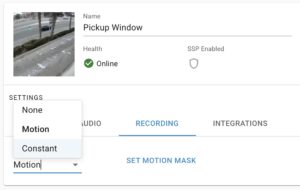
Best practice: Setting your cameras to Motion recording helps ensure that you are always capturing important activities and events, while significantly optimizing your video storage capacity by discarding hours of empty, inactive footage.
How Motion Recording Actually Works
Here is a look at how our motion recording technology works behind the scenes:
- Minute-Bound Segments: The system continuously records video in 1-minute segments.
- Activity Check: Once a minute of video is recorded, the system reviews that 1-minute segment.
- Keep or Discard: If any motion is detected at any point during that minute, the entire 1-minute file is saved. If there is no motion detected in that previous minute, the system deletes that 1-minute file after the fact.
Was this post helpful?
Let us know if you liked the post. That’s the only way we can improve.