
Physical Installation Procedures:
Cameras not streaming?
Check network settings on the Appliance page.
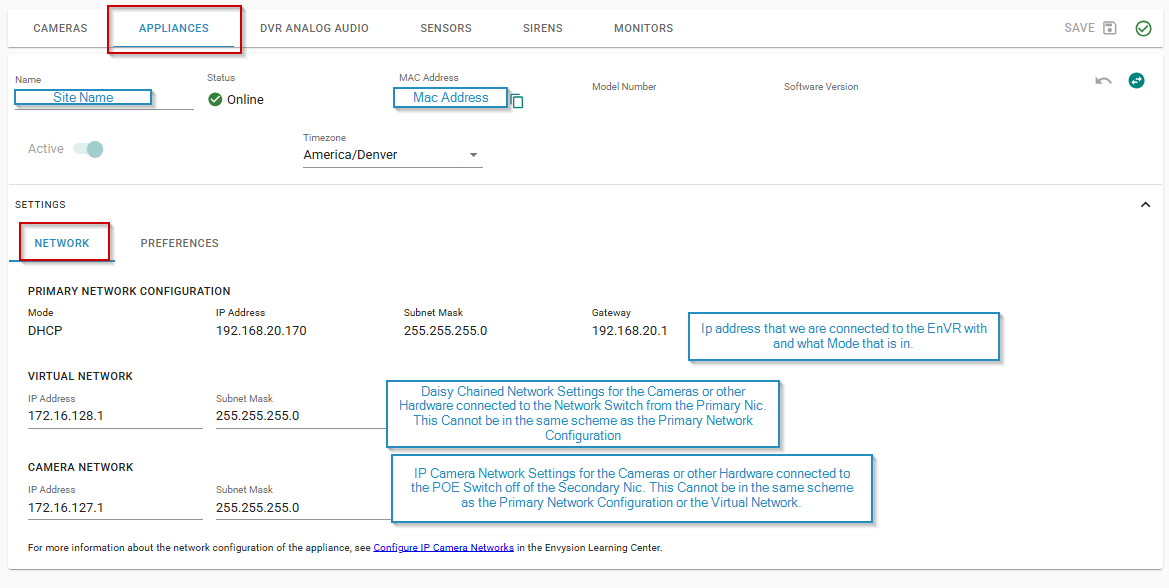
Common troubleshooting checks:
- Does the virtual network or Camera network match the ip addresses of the cameras? Are the cameras on the same ip address as the Primary Network?
- If not, update them to match and hit save in the top right corner.
- If cameras are on the same address scheme as the Primary Network the cabling path Must be Daisy Chained.
- If there are multiple EnVRs on site the virtual nic and camera nic for each EnVR cannot be exactly the same as it will cause a conflict.
- Example: if on EnVR 1 you have 172.16.127.1 you will need to change that on EnVR 2 to 172.16.127.2 or a whole different scheme.
Was this post helpful?
Let us know if you liked the post. That’s the only way we can improve.